Why office AI agents lose context across turns, what the research tests, and how to evaluate tool arguments, meeting updates and recovery.
Figures open at full size. Wide tables scroll sideways.
“Move it to two” is a simple instruction for someone who knows which meeting you just created. For an office agent, it is a test of several systems at once: conversation memory, intent recognition, tool selection and the arguments passed to the calendar service.
A mistake in any one can produce a perfectly fluent confirmation about the wrong meeting. That is why office automation needs evaluation below the level of a convincing chat demonstration.
Researchers at Kingsoft Office Software describe one way to divide this work in Multi-agent Application System in Office Collaboration Scenarios. Their WPS system separates planning from the extraction of tool arguments, with earlier stages for understanding follow-up requests and finding relevant tools. The useful lesson is how those responsibilities fit together—and how their evaluation exposes tradeoffs hidden by a single accuracy figure.
The architecture has a coordinating agent and specialist workers. Within the office assistant, the process is more specific than that label suggests.
First, a query-rewriting component checks whether the new request depends on the conversation. If it does, the system uses that context to make the request more explicit. Tool retrieval then supplies a relevant subset of the available APIs. The Planner breaks the request into tasks and selects the required operations. The Solver extracts the arguments for each operation, using the conversation and task context.
The paper’s flowchart includes an important branch: when information is missing, ask the user. After a tool call, its result updates memory before the next task proceeds.
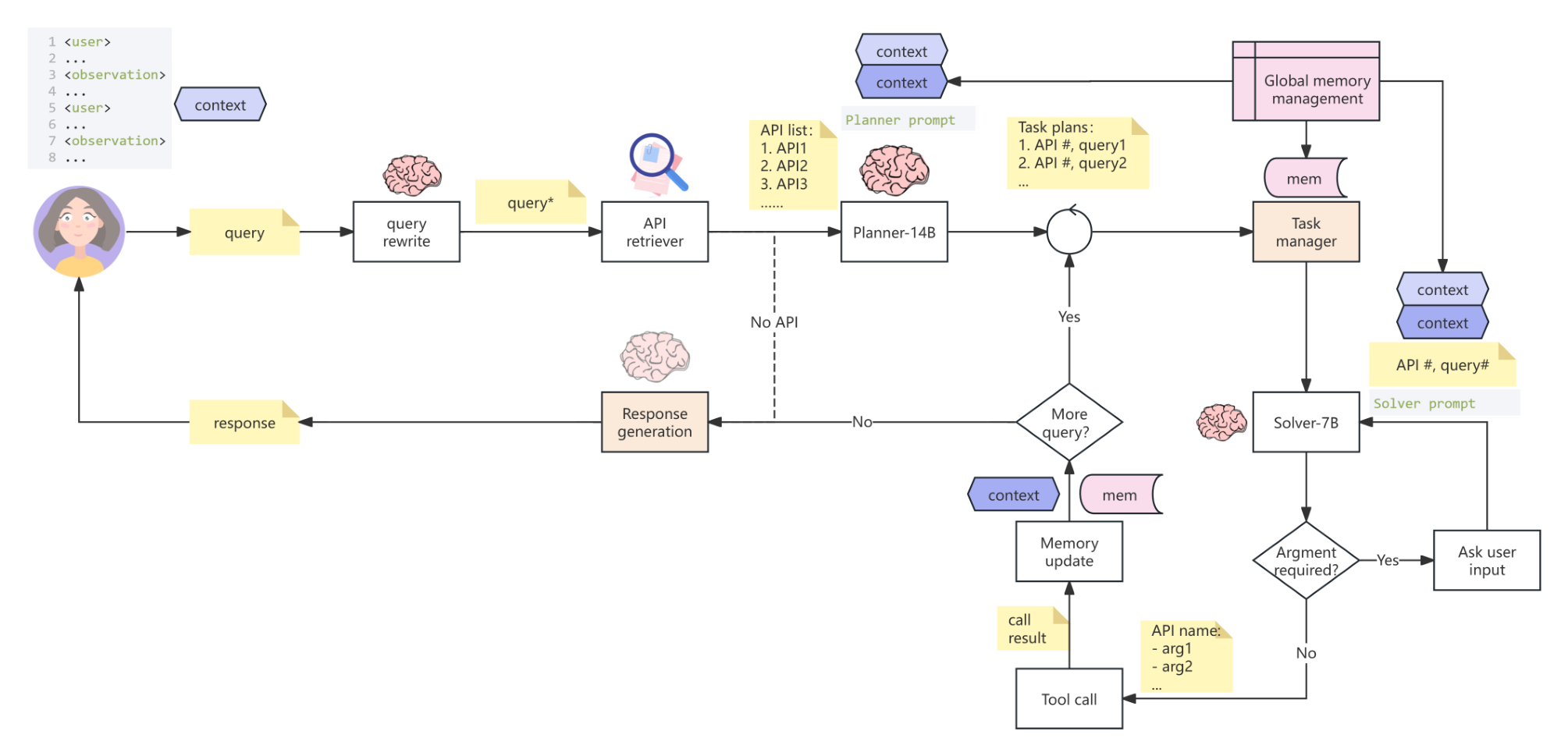
Separating these stages makes different errors distinguishable. The system might identify the correct calendar API but supply the wrong meeting identifier. Or it might extract a time correctly while treating a modification as a new meeting. A single model could perform these steps, but the paper’s design gives each a defined job and training data.
The paper’s business examples include creating a meeting at 3 PM, then moving its start to 2 PM. The second instruction refers to the meeting from the preceding turn; it does not repeat the title or participant.
To carry out that change, the assistant must preserve the identity of the created meeting and understand that the user wants an update. The relevant tool is an update operation. Its arguments need the affected event and new time, while the other event information remains associated with that event. The tool result then becomes the updated context for later requests.
This explains why remembering only the user’s words is inadequate. The successful creation response contains information the next step needs. If creation failed, there may be no event to modify. If several events could match, the system needs clarification rather than an invented choice.
The researchers also address tool-description size. A coordinator with a small tool set can include it in the prompt. A specialist with many tools and lengthy argument descriptions first retrieves likely candidates. This reduces the amount the Planner must consider, but introduces another failure point: a tool that never reaches the Planner cannot be selected correctly.
The authors fine-tune separate Qwen2.5 models for rewriting, planning and solving, and a bge-m3 retrieval model. These are historical configurations evaluated in the paper, not a current ranking of products.
For the Solver, an output counts as correct only when both the API and its parameters match. That is a more demanding target than selecting a plausible tool name. The original results also show why “more training data” or “the latest version” is not a complete selection rule.
| Base Model | Data Version | Total Data | Business Evaluation | Business Test Set | Context Test Set |
| GLM4 | - | - | 0.42 | - | - |
| GPT4 | - | - | 0.48 | - | - |
| Qwen2.5-7B-Instruct | v1 | 19547 | 0.678 | 0.8366 | 0.95215 |
| Qwen2.5-7B-Instruct | v2 | 34054 | - | 0.9085 | 0.85646 |
| Qwen2.5-7B-Instruct | v3 | 26478 | - | 0.89634 | 0.9195 |
In the business test set, Solver v2 scores 90.85%, compared with 83.66% for v1. On the context test set, however, v2 falls to 85.646%, compared with 95.215% for v1. Version 3 reaches 89.634% and 91.95%, respectively. A version that improves one test can weaken another.
For an office assistant, that tradeoff is operationally meaningful. Strong single-task behavior is insufficient if follow-up instructions lose their reference. Conversely, remembering context is insufficient if the final arguments are wrong. Evaluate both against the conversations people actually have.
The table also contains a separate “Business Evaluation” comparison with GPT4 and GLM4. Those values belong to a different evaluation column; they should not be mixed with the business or context test-set results to create a new ranking. The paper does not provide an independent measurement of organization-wide time savings or productivity gains. Its business section illustrates supported tasks. It even marks email sending and forwarding permissions as not yet open in those examples.
The data-annotation design is particularly useful for teams building their own assistant. The researchers label the API name, argument name, argument value and the text mentioning that value. They also label missing arguments and connect related annotations.
That creates a training and review record of where a proposed action came from. An incorrect time can be traced to the wrong phrase; an absent recipient can be recognized as missing information. Without this structure, an evaluator may only see a wrong final answer and have little guidance about which stage to improve.
The paper also enumerates transitions between tools, such as searching then summarizing email or creating then updating a meeting. Its parameter-combination counts describe the space of possible inputs, not the frequency of real user behavior. The practical implication is to collect representative transitions and difficult omissions, rather than fill a dataset with isolated, perfectly specified requests.
A sensible pilot is a calendar assistant that prepares changes in a sandbox. Use conversations that include creating an event, changing one field, abandoning a request and referring to an earlier event after another topic intervenes.
Store the actual event identifier and the latest successful tool result. Require a clarification when the reference is ambiguous. Before an update, show the proposed change and check that the event still matches the intended target. A service-side permission check remains necessary even if the model’s arguments look correct.
Measure complete conversations as well as individual stages. Record whether the correct event was changed, whether unrelated fields stayed intact, whether missing information triggered a useful question and whether a failed tool call was reported accurately. Include the existing deterministic workflow as a baseline. The paper motivates this evaluation design; it does not supply a universal launch threshold.
Start with existing application code when the sequence is predictable. A stored conversation state, explicit task queue and typed tool interfaces can implement rewriting, planning, validation and execution without a large agent framework. The crucial work is defining the data passed between stages.
Label Studio can support the annotation work. Its official labeling-interface documentation explains how to configure labels and inputs. For this use case, annotate the intended API, argument values, their source text and missing information, then have a second reviewer resolve disagreements. The tool organizes labels; it does not determine the correct business action.
LangGraph is an option for persistent, branching execution. Its orchestration documentation supports workflows mixing programmed and model-driven stages. Use it when the assistant needs to pause, retain state and resume. Keep actual calendar authorization and duplicate-write prevention in your application services. A smaller workflow may not need this additional dependency.
For a deeper look at preserving state when several agents revise a plan, see our SagaLLM analysis.
This paper is most useful as an engineering case study in conversational tool use. Its value comes from separating error sources and testing the handoffs, not from the number of agents in the diagram.
Before adding autonomy, demonstrate that your system carries the right object, arguments and execution result into the next turn. If a simpler implementation handles those transitions equally well, the research provides no reason to replace it merely to obtain a multi-agent label.
Multi-agent Application System in Office Collaboration Scenarios, Songtao Sun and colleagues, Kingsoft Office Software Inc. arXiv version 1, submitted 25 March 2025. Original architecture figure and Solver-results table reproduced with attribution.
Explore how a shared assistant should handle conflicting preferences and constraints.
Explore how agents preserve state and revise plans after a tool or earlier decision fails.
Collect individual constraints and preferences before asking an AI to choose for a group.